Branches

The Supporting Topics Layer of the Orchard Ecosystem Framework™

Your branches are the supporting topics that grow out from each trunk. They are the related questions, the subtopics, and the adjacent ideas that give a page depth without pulling it off-focus. A trunk without branches is a thin page. Too many branches, and the trunk gets lost. The right four to six add context, cover the questions a reader actually has, and signal topical authority to AI.

4thFramework Element
4–6Branches per Trunk
3Jobs Branches Do
9Total OEF Elements
The Orchard Ecosystem FrameworkEpisode 12

The Branches & The Orchard Ecosystem Framework™

A walk through how supporting topics create depth without losing focus, when a branch is really its own page, and the six most common branch mistakes. Grab the free companion worksheet to map yours.

October 1, 202638:20

Where This Fits

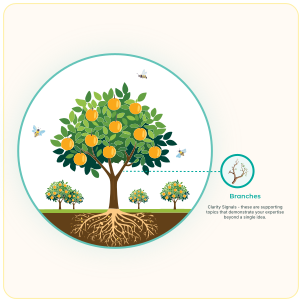
The Orchard Ecosystem Framework with Branches highlighted as the supporting topics growing from each trunk

Branches are the fourth element of the Orchard Ecosystem Framework™. If your trunk is the one clear purpose of a page, your branches are the supporting topics that grow out from it, the related questions and subtopics that give the page its full shape.

Branches are the four to six supporting topics that belong to a trunk. Not every related idea deserves to be a branch. The right ones add depth, cover the questions a real reader has, and make the page feel complete without becoming overwhelming. The wrong ones dilute the focus or belong on a page of their own.

In the diagram, the branches are doing three jobs:

  1. 1.

    Adding depth without dilution

    Branches surround the trunk with related context so the page can answer the actual question in full, not a thin version of it. Done well, every branch strengthens the trunk. Done poorly, each one pulls focus somewhere else.

  2. 2.

    Covering the reader's real questions

    A reader rarely has just one question. They have a cluster of related ones. Branches cover the follow-ups they would ask next, which is also what AI looks for when it decides whether a page actually answers an intent.

  3. 3.

    Signaling topical authority

    A trunk with the right branches shows you understand the whole topic, not just the headline. That cluster of coverage is what tells AI (and readers) that you are a real source on this, not someone writing around the edges.

What Branches Look Like in Your Business

In practice, your branches come from three places: the follow-up questions a reader has right after the main one, the objections or hesitations that come up before someone buys, and the adjacent topics that give a decision real context. Together, they build out the page without pulling focus off the trunk.

For a wedding photographer whose trunk is "wedding day photography," the branches might be timeline planning, how coverage hours work, what a gallery delivery looks like, destination-wedding considerations, and family group shots. For a bookkeeper whose trunk is "monthly bookkeeping for small businesses," the branches might be catch-up bookkeeping, how a monthly close works, what software integrations are supported, and when it's time to add a fractional CFO.

The hardest part is knowing what not to make a branch. A topic that needs a full page of its own is not a branch, it is a new trunk. A topic that only a few readers care about belongs in an FAQ. The art of branches is deciding what belongs on this page, right next to this trunk, and what belongs somewhere else.
A yoga studio, two ways

Same studio. Same "Prenatal Yoga Classes" trunk. The only difference is which supporting topics live on the page.

Right Branches

The page that gets found and booked

Four to six branches that answer what expecting mothers actually wonder: safe poses by trimester, what to wear and bring, how classes adapt as the pregnancy progresses, instructor training, and when to start.

Every branch supports the trunk. The page feels complete, and AI can see it covers the real cluster of prenatal yoga questions.

Wrong Branches

The page that drifts and gets ignored

Branches that drift: studio history, teacher bios, membership tiers, a note on hot yoga, a mention of their retail shop, and a link to their 200-hour teacher training.

Nothing is wrong with any one of those topics, but none of them belong on this trunk. The page loses focus and the prenatal-yoga question goes unanswered.

The right branches make a trunk whole. The wrong ones make it a different page.

🌿

Get The Free Branches Worksheet

A guided worksheet to help you map the right branches for one of your trunks. Includes an 8-to-10 brainstorm, a keep-cut-or-own-page audit, a final 4-to-6 shortlist with a gap check, and a copy-and-paste AI prompt to surface the subtopics you're already covering.

✓

Brainstorm Branches

Capture 8 to 10 possible supporting topics for one of your trunks

✓

Evaluate & Prune

Decide what stays, what gets cut, and what deserves its own page

✓

Final 4–6 + Gap Check

Lock your shortlist and see what's missing from the page today

No spam. Unsubscribe any time.

What's Next

Element 5: Leaves

Your branches are the supporting topics. Your leaves are the clarity signals — headings, scannability, meta descriptions, and the small formatting choices that make a page legible to both readers and AI. Coming next in the series.